
Mostly, yes - for a meme, a screenshot, or a photo you’d happily post publicly, a reputable online converter is fine. But “convert online” usually means “upload to someone else’s server,” and from that moment the file’s safety is a matter of policy, not physics. For anything sensitive, the question isn’t which converter site to trust - it’s whether the file needs to leave your device at all. Increasingly, it doesn’t.
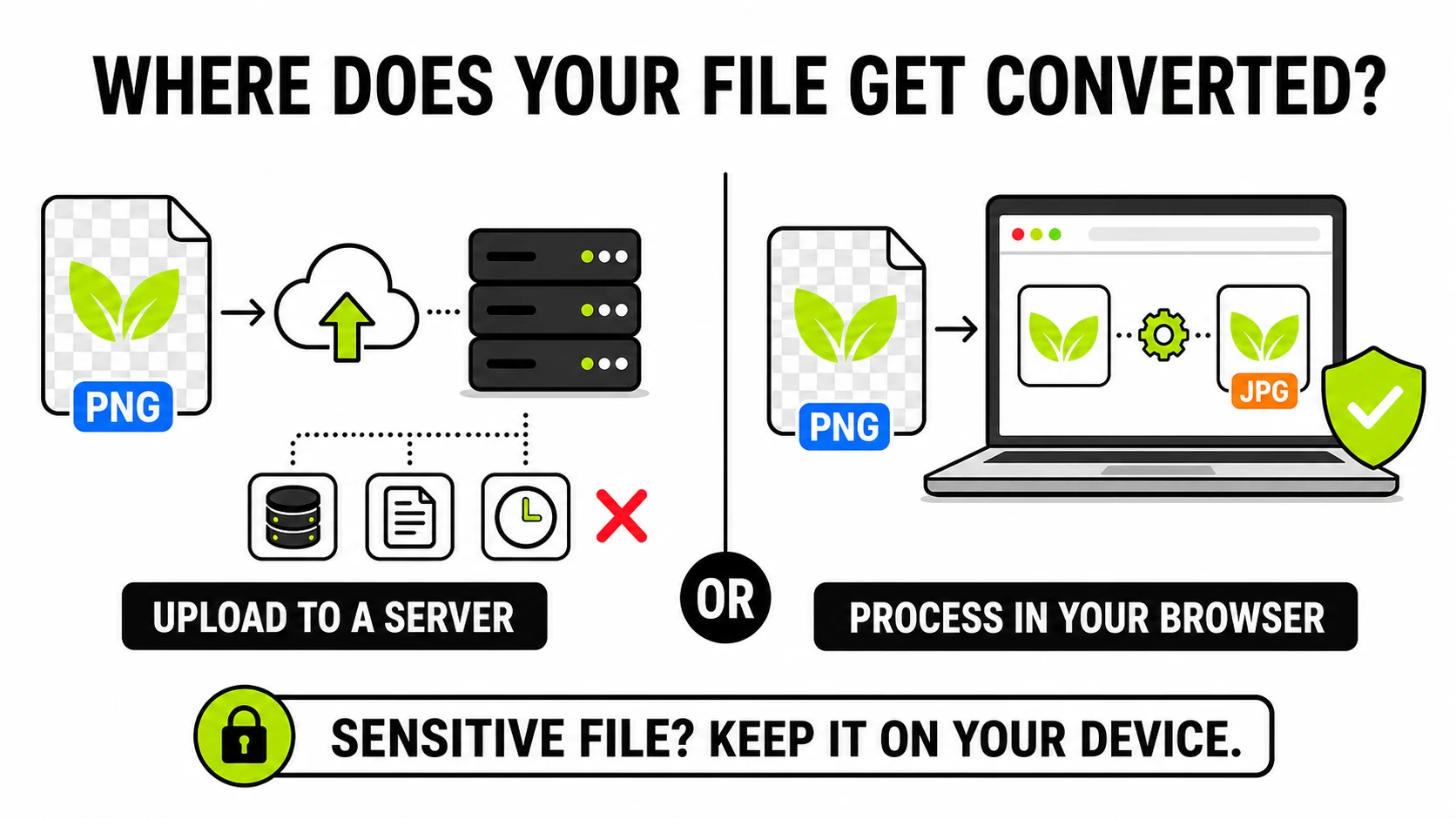
What actually happens when you upload a file to a converter?
The classic online converter works like this: your browser sends the file over the network to the site’s server. The server queues it, runs the conversion, writes the result to storage, and gives you a download link. Somewhere between minutes and a day later, a cleanup job deletes both copies.
Every step of that is normal engineering, and none of it is visible to you. While the file exists on their side, its safety depends on things you can’t inspect: who at the company can access the storage, whether the server is patched, whether uploads are logged, whether backups capture the window your file was there, and whether the deletion schedule actually runs. A “files deleted after 2 hours” badge is a claim, not a receipt - there’s no mechanism by which you could ever confirm it happened.
None of this requires bad intent. It’s simply what “upload” is. The important mental shift is that an online converter isn’t a magic box - it’s a stranger’s computer, plus a promise.
What are the real risks, honestly?
For most files, small. Nobody is mining your cat photos, and a breached cache of random memes harms no one. Overstating the danger is how privacy advice loses people. The risk scales with two things:
What the image shows. IDs, passports, contracts, medical documents, bank statements, photos of children, photos taken inside your home - these are the files where “it sat on an unknown server for a few hours” is a real problem rather than a theoretical one. They’re also, ironically, the files people convert most, because forms and portals demand specific formats.
What the image carries. A photo’s pixels are only half of what you upload. The hidden EXIF block can include the GPS coordinates of where it was taken and the device that took it - so a single uploaded photo can quietly disclose your home address to whatever infrastructure touches it. We covered exactly what’s in that block in What is EXIF data?, and you can strip it before sharing in seconds.
There’s also a lower-tech risk that has nothing to do with your file:
low-quality converter sites monetize aggressively, and the “Download” button
that’s actually an ad is a genre of its own. If a converter hands you an
.exe, a browser extension, or a “downloader app” instead of your image,
close the tab.
How can you tell if a converter is safe?
A short checklist separates the trustworthy from the sketchy faster than any review site:
- Does it say where processing happens? “Files are processed on your device / in your browser” is a specific, checkable claim. Vague reassurance (“we take privacy seriously”) with an upload bar is the default to assume.
- Can you verify it? This is the part most people don’t know they can do. Open your browser’s developer tools (F12), switch to the Network tab, and convert a file. An upload-based tool shows a POST request roughly the size of your file. A local tool shows nothing but the page’s own assets. The offline version of the same test: load the page, turn off Wi-Fi, convert. Local tools keep working with the network dead.
- Does the privacy policy state a retention period? A real number (“deleted within 24 hours”) beats silence. Silence beats “we may use uploads to improve our services,” which can mean anything, including training data.
- What does it demand? A single free conversion should cost you nothing - not an email address, not an account, not a permissions-hungry app install.
- Is the download what you asked for? A JPG in, a PNG out. Anything executable is an immediate no.
Image ConverterConverts JPG, PNG, and WebP entirely in this browser tab - pass the Network-tab test yourself. Nothing uploads.
Convert without uploading →When is a cloud converter actually the right choice?
An honest guide has to concede these, because they’re real:
- Heavy media formats. Video transcoding and large RAW batches genuinely benefit from server hardware; browser-based processing has a practical ceiling.
- Exotic formats. Obscure legacy formats sometimes only have decoders as server-side software. (The common “exotic” case - iPhone photos - no longer qualifies: HEIC converts locally with a decoder that runs in the browser.)
- Very weak devices. Local processing uses your hardware. A ten-year-old phone converting a 100-megapixel panorama may struggle where a server wouldn’t.
For everyday image work - format changes, compression, resizing, PDFs of receipts - none of those exceptions apply, and the upload is pure downside.
What does “processed in your browser” actually mean?
Modern browsers can do the work servers used to do. JavaScript and WebAssembly decode the image into pixels in your device’s memory, transform them, and re-encode the result - the same fundamental operations a converter server performs, minus the network round trip. The “download” at the end isn’t a download at all; it’s your browser saving a file it already has.
That architecture has a useful property: the privacy claim enforces itself. There’s no deletion policy to trust, because nothing arrives to delete; no breach can expose files that were never collected. It’s the difference between a promise and an impossibility - a distinction we think matters enough that we built the whole site on it. Even document-shaped work stays local: PDF pages render to images with the same engine Firefox uses, running in your tab.
The trade-off, stated plainly: your device does the work, so a large file takes a few seconds of your CPU instead of a server’s, and a very old device will feel it. For images, that’s almost always a fair trade for never having to wonder whose computer your file is on.
The five-second version
Online converters are a stranger’s computer plus a deletion promise - fine for public-shareable images, wrong for IDs, documents, and anything you’d mind leaking. The Network-tab test (or just going offline) tells you in ten seconds whether a tool uploads. When the file matters, use a converter where the file never leaves your device - then the safety question answers itself.