
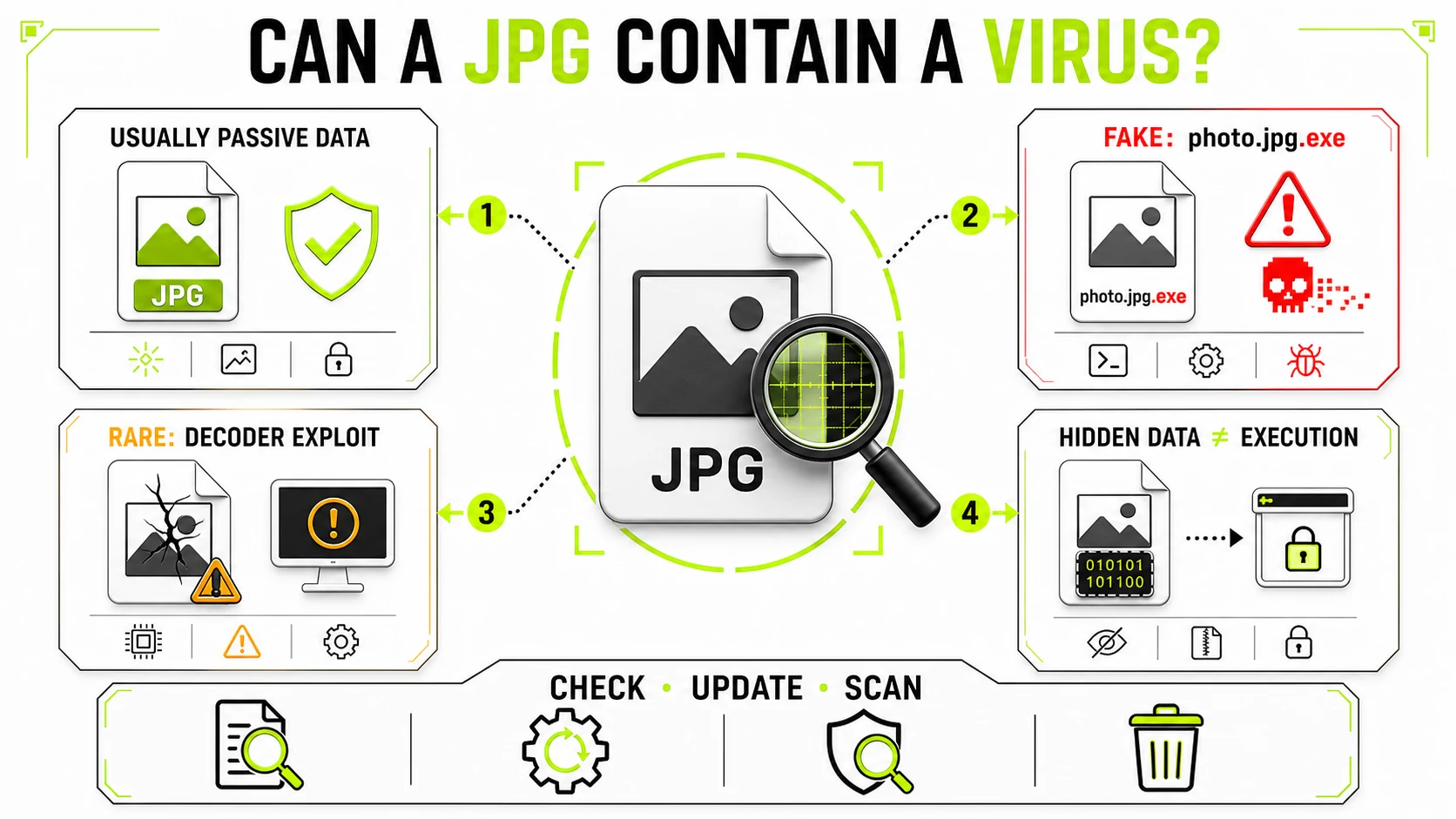
A normal JPG is passive image data, not a program, so it does not ordinarily
execute a virus when viewed. The real risks are a non-image disguised as
photo.jpg.exe, a rare malformed image targeting an unpatched decoder, or data
hidden inside a JPG for other malware to extract. Check the full file type,
source, and software updates before opening an unexpected image.
Can a JPEG file execute code by itself?
Not in the way an application, script, or installer does. JPEG defines how compressed pixels and supporting information are stored. An image viewer reads that structure, decompresses the pixels, and displays them. The JPEG format does not include a normal “run this program” feature.
That is why the most accurate answer is neither “JPGs can never be dangerous” nor “any JPG can contain a virus.” A file and the software that processes it form a system. The image supplies data; the viewer, browser, thumbnail service, or server-side library decides how to interpret those bytes. Risk appears when the file is not really a JPEG, the interpreting software has a security flaw, or another malicious component deliberately treats hidden bytes as code.
What are the four actual JPG risks?
| What you have | What makes it risky | Does viewing run it? | Practical response |
|---|---|---|---|
| Ordinary valid JPG | No known problem by itself | Normally no | Open with updated software |
photo.jpg.exe or renamed file | It is an executable or another format wearing an image-like name | Potentially yes | Do not open; reveal the full extension and delete or scan it |
| Specially malformed JPG | It targets a flaw in an image decoder | Only if the software is vulnerable | Update the OS, browser, viewers, and messaging apps |
| JPG carrying hidden data | Malware, commands, or configuration are stored in metadata, appended bytes, or pixels | Not without another component | Investigate the surrounding infection or suspicious sender |
This table also explains why antivirus software can flag a file that still opens as a picture. A valid image can contain a suspicious byte pattern without that pattern running in an ordinary viewer. Conversely, a harmless-looking thumbnail tells you only that some software decoded an image; it does not prove that every byte or the surrounding download is trustworthy.
How can a fake JPG disguise an executable?
The simplest “image virus” may not be an image at all. A file named
holiday-photo.jpg.exe is an executable because the last extension is .exe.
If a file manager hides known extensions, the visible name may appear to end in
.jpg, and a custom icon can make the disguise more convincing.
On Windows, open File Explorer and enable View → Show → File name
extensions. Then inspect the complete final suffix. Be cautious with endings
such as .exe, .scr, .msi, .bat, .cmd, .js, .vbs, .hta, and
.lnk, especially when an email or chat message described the attachment as a
photo.
Renaming program.exe to photo.jpg does not convert its contents into JPEG.
The same principle works in the other direction: changing photo.jpg to
photo.png does not perform image conversion. A trustworthy application should
identify the actual file structure rather than relying only on the name.
Can a real JPG exploit an image viewer?
Rarely, yes. Image decoders are software, and software can contain bugs. A malformed file can be crafted to trigger an out-of-bounds read, memory corruption, or another implementation flaw. If the defect permits code execution and the vulnerable version processes the file, merely generating a preview or thumbnail may be enough to reach the faulty code.
This is not a JPEG feature; it is an unintended behavior in a particular decoder version. It is also why “I will not double-click it” is not a complete security strategy. Email clients, file explorers, browsers, photo libraries, and websites may decode images automatically to create previews.
The effective protection is ordinary patching:
- Keep the operating system and browser supported and updated.
- Update messaging, email, photo-editing, and document applications.
- Remove obsolete image viewers and plugins you no longer need.
- Treat an unexpected attachment as suspicious even when its preview works.
Do not download a strongly suspicious image just to test it in five different viewers. Each decoder is another parser exposed to the same untrusted input.
What does “malware hidden in a JPG” mean?
It usually means the JPEG is a container or communication channel, not a self-running program. Attackers can store information in several places:
- Metadata fields can hold text or arbitrary byte sequences.
- Appended data can appear after the JPEG end marker. Many viewers stop at the end of the image and ignore the remainder.
- Steganography can encode information in pixel or compression details so the visible picture changes little.
- Polyglot construction can arrange bytes so different programs interpret the same file in different ways.
For hidden malware to become active, something still has to retrieve and execute it. That “something” might be malware already running on the computer, a script on a compromised server, or a vulnerable parser. A concrete SANS analysis of a malicious-looking JPEG found PHP code stored in image metadata or appended data. Normal Windows image viewing did not execute it; another component on a compromised web server used the image as storage.
This distinction matters during incident response. Finding such a JPG in a browser cache does not automatically prove that the desktop was infected. The same file appearing in a website’s upload directory may be evidence that the server needs investigation.
How can you check whether a JPG is safe?
No single visual check proves safety, but this sequence handles the common cases without turning every family photo into a forensic investigation.
- Check the context. Were you expecting this image from this person? A strange message from a familiar account may mean the account was taken over.
- Reveal the full filename. Confirm the final extension is
.jpgor.jpeg, not an executable suffix or shortcut. - Check what the system thinks it is. File properties should identify a JPEG image. A mismatch between name, icon, type, and size deserves caution.
- Scan an unexpected file. Use the security software built into the OS or an approved organizational scanner. Do not upload confidential images to a public scanner without considering its retention policy.
- Update before decoding. Install pending security updates for the OS, browser, messaging app, and image software.
- Delete when the value is low and suspicion is high. You do not need to solve a mystery attachment. Ask the sender to resend it through a known channel.
On macOS and Linux, the names and menus differ, but the reasoning is the same: inspect the actual file type, keep parsers updated, and distrust unexpected content rather than trusting an icon.
Does converting a JPG remove malware?
Re-encoding an ordinary, trusted image can create a simpler output containing fresh pixels and standard metadata. It normally leaves behind appended bytes, unrecognized chunks, and the original compressed structure. This is useful for normalizing files and reducing privacy baggage.
It is not a universal sanitization guarantee. A converter must decode the source before it can re-encode the pixels, so a decoder exploit targets the first half of that process. Feeding a suspicious attachment into a random online converter may expose another parser and upload the file to a third party.
Use GenClean’s Image Converter to normalize an image you have a reasonable basis to trust, not to investigate a suspected attack. Conversion happens locally, but “local” describes where processing runs; it does not turn an image decoder into a malware scanner.
Does removing EXIF or metadata make the image safe?
No. Metadata cleaning and malware detection solve different problems.
The Metadata Cleaner reports embedded fields and creates a re-encoded copy without carrying the original metadata forward. That can remove GPS coordinates, device details, editing history, comments, and data stored in recognized metadata areas. The EXIF Viewer can show common fields before you share a photo.
Neither tool can certify that a file is free of malicious content. They do not replace endpoint protection, software updates, sandbox analysis, or an incident response process. If an unexpected attachment is suspicious enough that you are asking whether it is malware, scan or delete it before trying to clean it.
Metadata CleanerInspect and remove privacy metadata from an image you trust. This is privacy cleaning, not antivirus scanning.
Check image metadata →Are PNG, WebP, and SVG files different?
PNG and WebP are raster formats like JPEG: they primarily describe pixels, but their decoders can also have vulnerabilities. The same update-and-source rules apply. A format being “just an image” reduces direct execution features; it does not make every parser perfect.
SVG deserves separate treatment. It is an XML-based document format used to describe vector graphics. Depending on where and how it is opened, SVG can include links, external resources, animation, and scripting-related behavior. Website upload systems commonly sanitize SVG separately or disallow it while accepting JPG and PNG. Do not assume advice about passive JPEG pixels applies unchanged to an SVG attachment.
What should you do with a suspicious image right now?
- Expected photo, normal
.jpg, updated device: ordinary viewing is low risk. Privacy metadata is a separate question. - Unexpected attachment from a known contact: confirm through another message or channel before opening it.
- Double extension or executable type: do not run it. Delete or quarantine it and report the message where appropriate.
- Security software warning: do not override the warning merely because a thumbnail looks valid.
- File found during a server incident: preserve evidence and investigate the surrounding system; hidden code may be intended for a server component.
- Highly sensitive but legitimate photo: use local processing and review what happens when an online converter receives a file before uploading it anywhere.
The useful conclusion is calm rather than absolute: a genuine JPEG is usually passive data, but filenames can lie and decoders are software. Verify the file, keep that software patched, and let the context determine whether an unexpected image deserves opening at all.