
300 DPI usually means the image should supply 300 pixels for every inch of the final print. An 8 x 10 inch print therefore needs 2400 x 3000 pixels. Changing a file’s DPI tag can change its intended print size, but it cannot add missing detail or turn a small image into a genuinely high-resolution one.
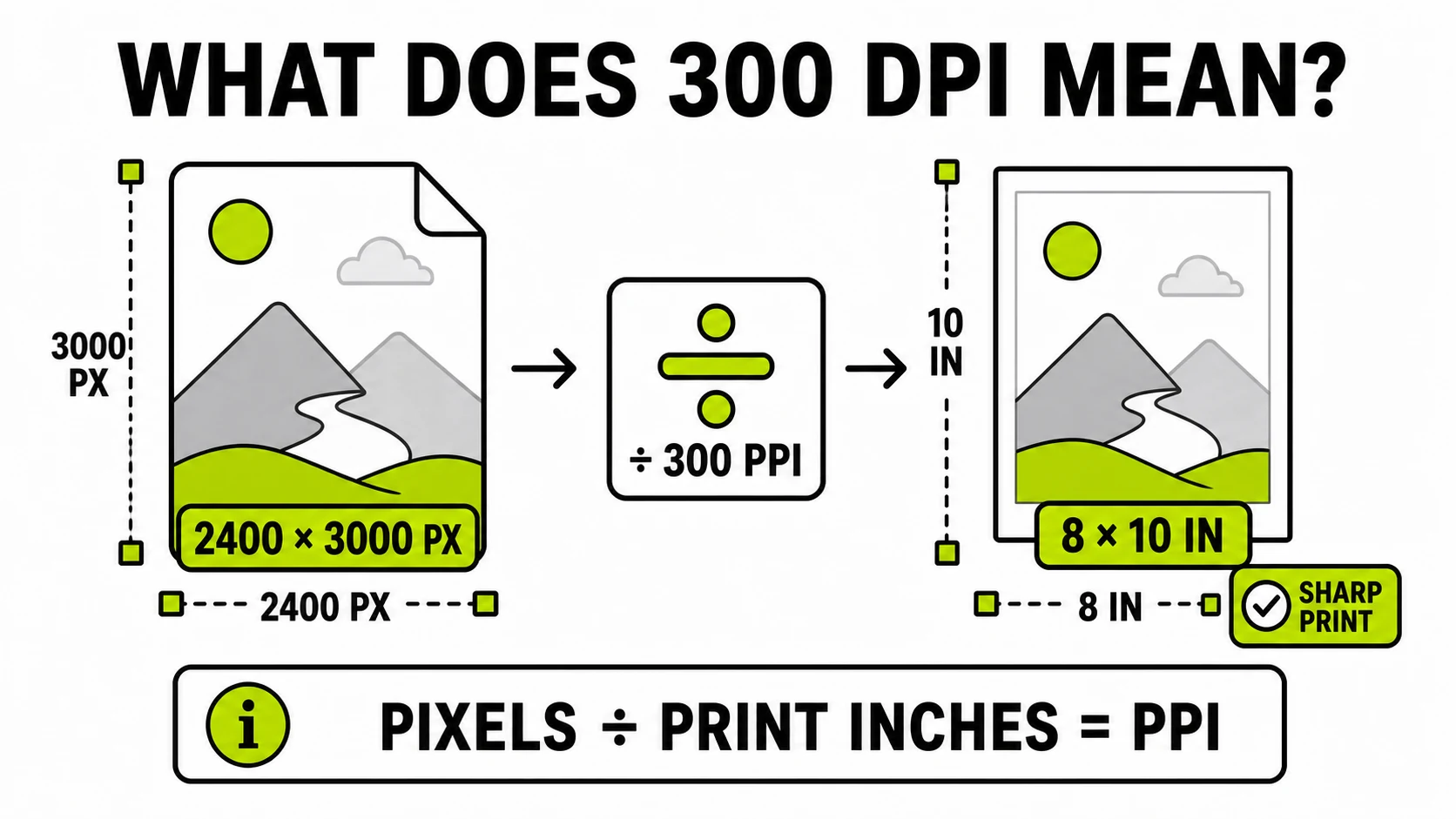
What does 300 DPI actually mean?
For a digital image, the useful interpretation is 300 pixels per inch at the final print size. A one-inch line in the printed image is represented by 300 image pixels. A ten-inch line needs 3,000 pixels.
The vocabulary is untidy. PPI means pixels per inch and describes how an image’s pixels are distributed across a physical print. DPI means dots per inch and properly describes the much smaller ink or toner dots a printer uses to reproduce those pixels. One image pixel may be rendered with several printer dots.
Clients, submission portals, and even software dialogs often say “300 DPI” when they mean “prepare the raster image at 300 PPI.” You do not need to correct the person giving the specification. You do need to translate the request into two facts: the required physical size and the required pixel dimensions.
How do you calculate 300 DPI print size?
Use either form of the same relationship:
print size in inches = pixels / PPI
required pixels = print size in inches x PPI
Suppose a photo is 2400 x 3000 pixels. At 300 PPI:
2400 / 300 = 8 inches
3000 / 300 = 10 inches
That file can supply an 8 x 10 inch image at 300 PPI before accounting for bleed or cropping. Printing it at 16 x 20 inches spreads the same pixels across twice the width and height, producing 150 PPI. Nothing happened to the file; only the physical use changed.
| Final print size | Pixels required at 300 PPI |
|---|---|
| 4 x 6 inches | 1200 x 1800 |
| 5 x 7 inches | 1500 x 2100 |
| 8 x 10 inches | 2400 x 3000 |
| 8.5 x 11 inches | 2550 x 3300 |
| 11 x 14 inches | 3300 x 4200 |
| A4, approximately 8.27 x 11.69 inches | 2481 x 3507 |
Ask the printer whether the stated dimensions include bleed. A design that must extend 0.125 inch beyond every edge needs a larger pixel canvas than the final trim size alone suggests.
Does changing 72 DPI to 300 DPI improve quality?
No, not when only the metadata changes. Consider a 3000 x 2400 pixel photo:
- Tagged at 72 PPI, its declared print size is about 41.67 x 33.33 inches.
- Tagged at 300 PPI, its declared print size is 10 x 8 inches.
- In both files, the pixel dimensions and visible image detail are identical.
The new tag tells print-aware software to place those existing pixels more tightly. It does not invent sharper eyelashes, cleaner text edges, or more camera detail.
Adobe’s explanation of printed image resolution makes the same distinction: changing resolution without resampling preserves the image data and changes physical dimensions; resampling changes the pixel count itself.
You can check and change image DPI when a print
portal expects a resolution tag. GenClean reads JPG and PNG dimensions locally,
reports the embedded value and estimated print size, then writes a new JPEG
JFIF density or PNG pHYs value without decoding and recompressing the image.
Image DPI Checker & ChangerInspect JPG or PNG print metadata, calculate its print size, and set a value such as 300 DPI without resampling the pixels.
Check an image's DPI locally →What is the difference between changing DPI and resampling?
These operations are regularly hidden behind the same “change resolution” label, but they solve different problems.
Changing the DPI or PPI tag
A metadata-only change keeps width and height in pixels fixed. It changes the intended physical print size. This is appropriate when the file already has enough pixels and a portal merely requires a 300 PPI declaration.
Because the compressed pixels are preserved, this operation should not soften the image or meaningfully increase its file size. Software may still ignore the tag and use its own placement size, so always check the final print layout.
Resampling the image
Resampling creates a new pixel grid. Reducing 6000 x 4000 pixels to 3000 x 2000 discards pixels. Enlarging 1200 x 800 to 3000 x 2000 estimates new pixel values from existing ones. Modern enlargement can look smoother, but it does not recover detail that the camera, scanner, or original export never captured.
Use the image resizer only when the required pixel dimensions themselves must change. Keep an untouched original, and inspect small text, hair, diagonal edges, and compression artifacts at full size before accepting an enlarged result.
Is 300 DPI always required for printing?
No. It is a common target for detailed material viewed at close range, such as photos, brochures, books, and product packaging. It is not a physical law.
Large posters and displays are viewed from farther away, so a lower effective PPI may be acceptable. Fine line art or tiny type can demand a different workflow. The printing process, paper, source sharpness, and vendor requirements all matter. A motion-blurred 24-megapixel photo remains blurred at 300 PPI, while a sharp image below 300 PPI may still make a useful print at the intended distance.
Use the printer’s specification when one exists. If it says “300 DPI at final size,” calculate against the final placed dimensions rather than trusting the number displayed in file properties.
Does DPI matter for websites and social media?
Usually no. Browsers lay out raster images using pixel dimensions, CSS sizes, and device pixel ratios. A 1200 x 800 image tagged 72 PPI and another tagged 300 PPI normally occupy the same web layout when their HTML and CSS dimensions are the same.
For the web, focus on:
- enough pixel dimensions for the largest rendered size and high-density screens;
- an appropriate format such as JPG, PNG, WebP, or AVIF;
- a sensible file size for download speed;
- explicit width and height attributes to reduce layout movement.
Do not enlarge an image merely to make its metadata say 300. If page weight is the problem, compress the image or resize its pixel dimensions for the actual display slot.
What should you do when someone requests a 300 DPI file?
Start with the complete requirement, not the number in isolation.
| Situation | Correct action |
|---|---|
| The portal requires a 300 DPI tag, and the image already has enough pixels | Change the metadata to 300 without resampling |
| The printer requires 8 x 10 inches at 300 PPI | Supply at least 2400 x 3000 pixels, plus any bleed |
| The image has too few pixels for the requested print | Use a larger original, reduce the print size, or discuss acceptable lower PPI |
| The image must fit exact pixel dimensions | Resize or crop to those dimensions; the DPI tag is secondary |
| The image is only for a website | Optimize pixel dimensions, format, and bytes rather than DPI |
Before submission, verify the output rather than trusting its filename. Check the pixel width and height, embedded density, estimated physical size, crop, orientation, color appearance, and the recipient’s accepted format. If the file must also stay below an upload limit, change print metadata first and then make a separate, carefully compressed sharing copy.
The practical rule is simple: pixels determine how much image information you have; print inches determine how far that information must stretch; PPI is the relationship between them. A 300 DPI label is useful only when those other two numbers are known.