
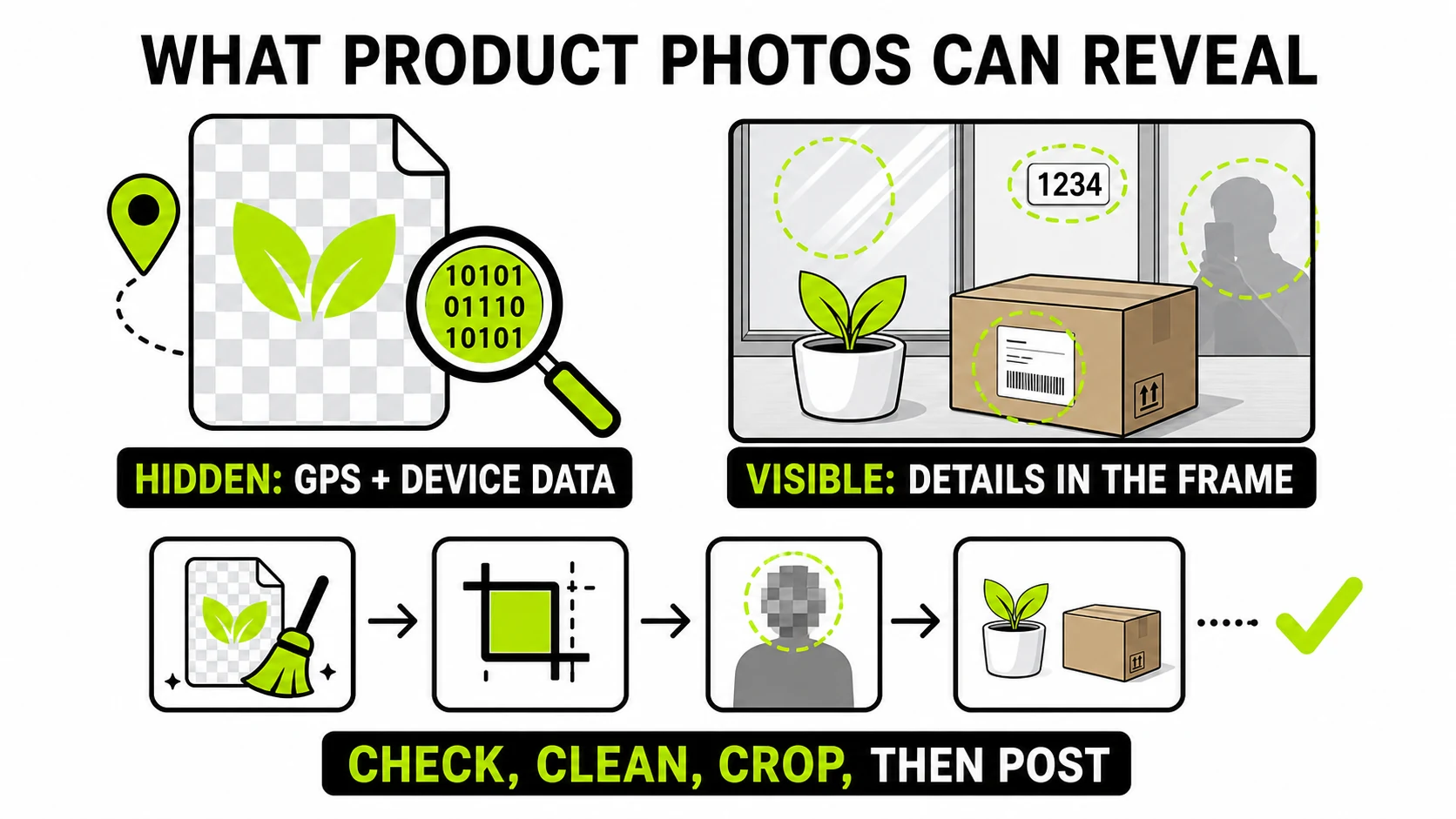
Selling something online means putting a photo of your stuff, in your home, in front of strangers - and that photo can leak in two completely different ways: hidden data in the file (GPS coordinates, device details) and visible information in the frame (house numbers, mail, reflections, what’s on the shelf behind the item). Fixing one doesn’t fix the other. Here’s a pre-listing check for both.
Why sellers specifically are exposed
Sharing a photo with a friend and posting one on a public marketplace carry completely different risk, even if the photo is identical. A friend already knows roughly where you live. A marketplace listing is visible to everyone who searches the category - strangers who haven’t earned any trust yet, looking at your home, your schedule (implied by “available evenings”), and now, potentially, your exact address, before a single message is exchanged. The photo is doing that broadcasting whether or not you meant it to.
There’s a second, less obvious angle: the same photo, reused across multiple listings or platforms, can let someone connect accounts that were otherwise anonymous - a username on one marketplace and a real name on another, tied together by a reverse image search on a background detail that appears in both. Cropping tightly to the item, not just checking metadata, cuts this risk too.
The part that’s invisible: EXIF metadata
Most phone cameras geotag every photo with precise GPS coordinates by default - it’s a convenience feature (so Photos can group pictures by place) that quietly becomes a liability the moment that file leaves your phone. A buyer who downloads your listing photo full-size can extract exact coordinates from a file that visually shows nothing but a used bookshelf.
This isn’t visible in any app that displays the photo normally - you have to specifically look at the metadata to know it’s there, which is exactly why it’s the risk people forget about. Check what a photo is actually carrying before you post it; GPS coordinates, when present, show up flagged clearly.
Metadata CleanerStrip GPS, device, and timestamp data from a listing photo before it goes anywhere - the image itself is untouched.
Clean a photo →The part that’s visible: what’s actually in the frame
Metadata cleaning does nothing about what a camera captured on purpose - and marketplace photos, taken quickly at home, routinely include things the seller never consciously framed:
- Reflections. Glossy surfaces - phone screens, glass cabinet doors, chrome appliances, mirrors, even a TV that’s off - reflect the room, sometimes including you. A face or a house number caught in a reflection is real information, just at one remove.
- Mail and packages. A shipping label, an addressed envelope, or a delivery box in the background is a full name and address, in plain text, larger in the frame than most people notice while shooting.
- House numbers and street signs, visible through a window or in a driveway shot of a car or bike for sale.
- What else is in view. Other valuables visible on a shelf or wall tell a stranger what else is in your home - worth a second look before posting, independent of privacy concerns.
- Faces you didn’t intend to include. A family member walking through the background, a neighbor visible through a window, a child’s face on a photo pinned to the fridge behind the item.
- Screens. A laptop or phone screen in shot, even blurred by distance, can be legible enough at full resolution to read a name, an open tab, or a notification.
None of this shows up in an EXIF viewer, because it isn’t metadata - it’s pixels, sitting in the frame at full resolution for anyone who opens the photo. The fix is a second, deliberate look at the photo itself before posting, not a metadata tool pass - the two catch entirely different things, and running one doesn’t mean the other isn’t necessary.
When you can’t reshoot: blur what’s already in the frame
Sometimes the item’s context is unavoidable - a car parked in your driveway with the house number in shot, or a reflection you didn’t notice until reviewing the photo. Rather than reshoot, blur or blackout the specific region: drag a box over a license plate, a reflection, a house number, or a face caught in the background, and the rest of the photo - the actual item you’re selling - stays untouched and full quality.
A pre-listing checklist
- Check the photo’s metadata for GPS - if it’s flagged, strip it before doing anything else.
- Zoom into the corners and any reflective surface at full resolution - phones and glossy items are the most common accidental leak.
- Check what’s readable through any window, mirror, or open doorway in the shot, and on any screen visible in frame.
- Look for faces in the background you didn’t intend to include - family members, neighbors, photos-of-photos on a wall.
- Blur or black out anything you can’t crop or reshoot around.
- Clean the metadata as the last step, right before uploading.
- If you’re posting the same item across multiple platforms, use freshly cropped or reshot photos on each rather than the identical file - it limits how easily the listings (and you) can be linked together.
Pickup vs. shipping changes what’s actually at risk
Meeting a buyer in person for pickup means you’re already choosing to disclose a location - but it’s a location and time you pick, ideally somewhere public, not your home address handed over automatically by a photo’s hidden GPS data before any conversation happens. Shipping an item sidesteps the meetup risk but adds a shipping label with your name and return address, visible in any unboxing photo the buyer might post - worth remembering the exposure doesn’t necessarily end when the listing photo is clean.
What this doesn’t cover
None of this replaces ordinary in-person selling caution - meeting in a public place, not sharing your exact address until a sale is agreed, and trusting your judgment about a buyer. Cleaning the photo just makes sure the image itself isn’t doing that disclosure for you before a conversation even starts.
Every step above runs locally in the browser - the photo of your address- revealing living room never has to go to a server to be checked or fixed.